
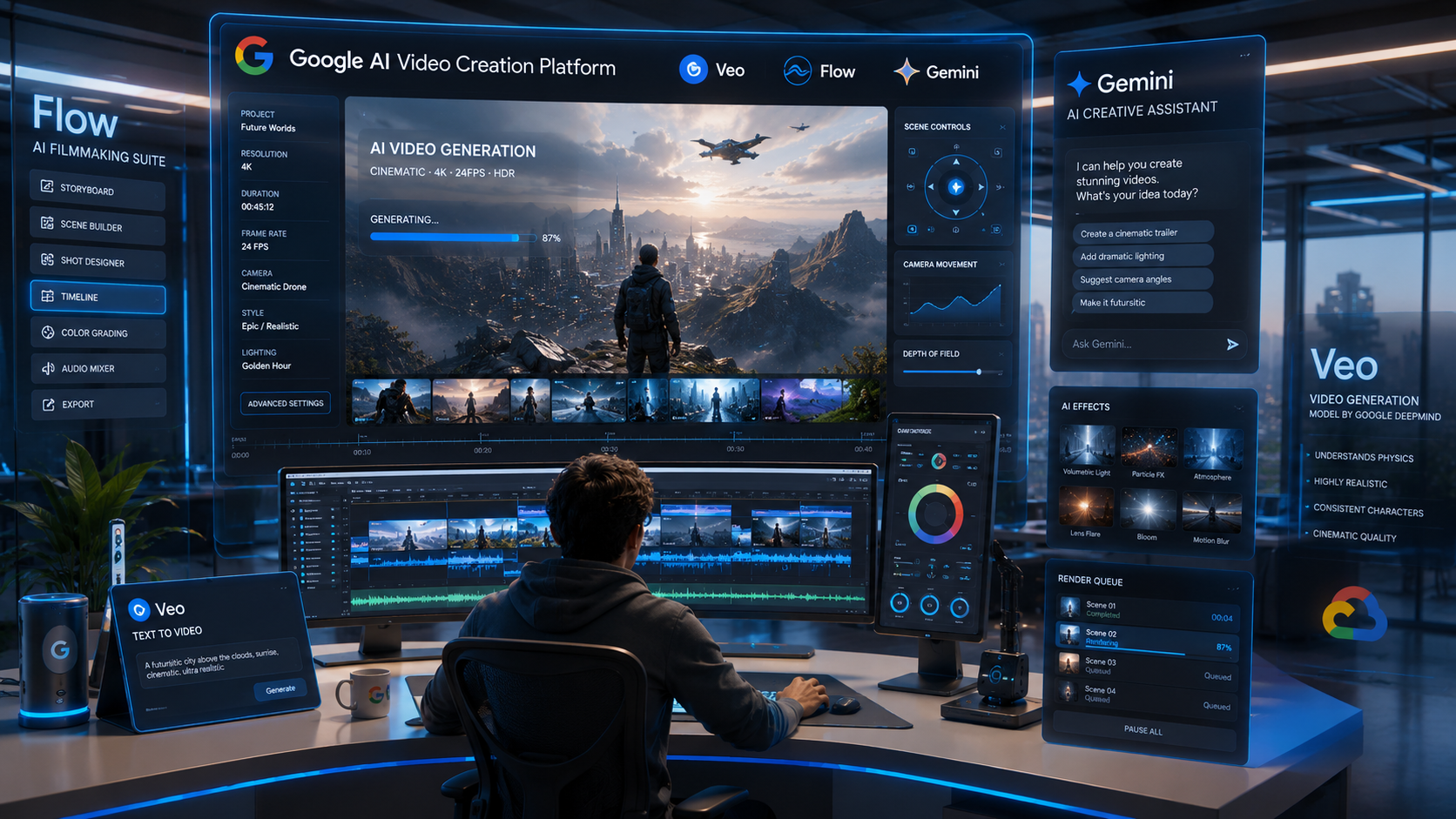
Artificial intelligence is rapidly transforming the way content is created, and video production is one of the biggest beneficiaries of this shift. In 2026, the Google AI Video Creation Platform has emerged as one of the most powerful ecosystems for generating professional-quality videos using natural language prompts, images, scenes, and storytelling instructions.
What once required expensive cameras, production teams, editing software, and weeks of effort can now be accomplished with AI-assisted workflows in minutes.
Google has invested heavily in AI-generated media through technologies developed by Google and Google DeepMind. These efforts have resulted in a growing suite of video-generation tools including Veo, Flow, Gemini-powered creative workflows, and advanced multimodal AI models.
In this guide, you’ll learn:
- What Google’s AI video platform is
- How Veo generates videos from prompts
- How Flow enables AI filmmaking
- Key features and capabilities
- Real-world creator use cases
- Pricing and availability
- Advantages over traditional video production
- Future trends in AI-generated video
If you’re a creator, marketer, educator, designer, developer, or business owner, understanding the Google AI Video Creation Platform may become an essential skill over the next few years.
Table of Contents
What Is Google’s AI Video Creation Platform?
The Google AI Video Creation Platform refers to Google’s ecosystem of AI-powered technologies designed to generate, edit, and enhance videos using natural language and multimodal inputs.
Rather than being a single application, it is a collection of interconnected AI systems that work together to simplify video production.
Major components include:
- Veo
- Flow
- Gemini
- Imagen integration
- AI audio generation tools
- Creative workflow assistants
- Enterprise AI content capabilities
Together, these technologies allow users to move from idea to finished video significantly faster than traditional production methods.
For creators, this means spending less time on technical tasks and more time focusing on storytelling and creativity.
Understanding Veo
Veo is Google’s flagship AI video generation model.
It is designed to create highly realistic videos from text prompts, images, scenes, and creative instructions.
Think of Veo as the video equivalent of what Imagen does for images.
A creator can describe a scene such as:
“A cinematic drone shot flying over a futuristic city at sunrise with reflective skyscrapers and light fog.“
Veo can generate a video sequence matching that description.
Key capabilities include:
High-Quality Video Generation
Veo can generate:
- Realistic environments
- Human motion
- Camera movements
- Dynamic lighting
- Cinematic scenes
Advanced Prompt Understanding
Because Veo leverages Google’s multimodal AI capabilities, it understands:
- Scene composition
- Camera angles
- Visual style
- Mood
- Action sequences
Consistent Storytelling
One of the biggest challenges in AI video generation is maintaining consistency between scenes.
Veo significantly improves:
- Character consistency
- Object continuity
- Scene coherence
This makes longer-form storytelling more practical.
Understanding Flow
While Veo focuses on generating video content, Flow focuses on AI filmmaking workflows.
Flow can be thought of as an intelligent creative studio.
It helps users:
- Organize scenes
- Generate sequences
- Build narratives
- Control camera directions
- Manage storytelling elements
Instead of generating isolated clips, Flow helps assemble complete productions.
For creators, this represents a major shift from video generation to AI-assisted filmmaking.
Core Features of Google’s AI Video Ecosystem
The Google AI Video Creation Platform combines several advanced capabilities.
Text-to-Video Generation
Users can generate videos directly from prompts.
Examples:
- Marketing videos
- Product demonstrations
- Educational content
- Storytelling videos
- Social media content
Image-to-Video Generation
Static images can be transformed into animated scenes.
This helps creators:
- Reuse design assets
- Create motion graphics
- Generate cinematic effects
Camera Control
Users can specify:
- Zoom
- Pan
- Tilt
- Tracking shots
- Drone-style movement
This level of control significantly improves production quality.
Style Consistency
Creators can maintain:
- Visual identity
- Character appearance
- Color grading
- Scene aesthetics
across multiple generated clips.
Multimodal Inputs
Google’s AI ecosystem supports:
- Text
- Images
- Audio
- Contextual instructions
which are allowing more sophisticated creative workflows.
How AI Video Generation Works
At a high level, Google’s video generation models follow several stages.
Step 1: Prompt Understanding
The AI analyzes:
- Subject
- Environment
- Action
- Mood
- Style
Step 2: Scene Planning
The system builds a visual representation of the requested content.
Step 3: Motion Generation
The model predicts:
- Character movement
- Camera movement
- Environmental dynamics
Step 4: Rendering
The generated frames are assembled into coherent video sequences.
Step 5: Refinement
Additional AI systems improve:
- Realism
- Consistency
- Lighting
- Motion quality
The result is a polished video output that aligns closely with the original prompt.
Benefits for Creators
The Google AI Video Creation Platform offers several significant advantages.
Faster Production
Tasks that previously took days can now be completed within minutes.
Lower Costs
Creators can reduce spending on:
- Equipment
- Studio rentals
- Editing resources
- Production teams
Creative Experimentation
AI enables rapid testing of following creative experiments without large investments:
- Concepts
- Styles
- Visual directions
Accessibility
Small creators gain access to capabilities previously available only to large studios.
Increased Productivity
Teams can produce more content while maintaining quality standards.
Business Use Cases
The Google AI Video Creation Platform is not limited to content creators. Businesses across industries are beginning to integrate AI-generated video into their marketing, communication, and training workflows.
Marketing Campaigns
Brands can create:
- Product launch videos
- Social media advertisements
- Promotional content
- Seasonal campaigns
- Localized marketing materials
Instead of producing dozens of video variations manually, AI can generate multiple versions optimized for different audiences.
Product Demonstrations
Businesses can quickly produce:
- Feature walkthroughs
- Explainer videos
- SaaS onboarding content
- Product showcases
This is especially valuable for startups and small businesses with limited production budgets.
Internal Communications
Organizations can generate:
- Company announcements
- Training videos
- HR onboarding content
- Knowledge-sharing materials
AI video creation significantly reduces the effort required to maintain updated training resources.
Customer Support
AI-generated videos can improve customer experience by providing:
- Troubleshooting guides
- FAQ explanations
- Interactive walkthroughs
- Visual product instructions
Educational Applications
One area where Google’s AI video ecosystem could have a major impact is education.
Online Learning
Educators can generate:
- Animated lessons
- Concept explanations
- Visual storytelling content
- Interactive educational videos
Complex topics become easier to understand when presented visually.
Corporate Training
Companies can create customized training materials for:
- New employees
- Compliance programs
- Product education
- Technical certification paths
Student Projects
Students can use AI-generated video tools to create:
- Presentations
- Research projects
- Creative assignments
- Portfolio content
This lowers technical barriers and encourages creativity.
AI Filmmaking Workflows
Traditional filmmaking requires multiple stages:
- Script Writing
- Storyboarding
- Production
- Editing
- Post-Production
AI is transforming each of these stages.
Step 1: Idea Generation
Creators can use Gemini to brainstorm:
- Story concepts
- Characters
- Dialogue
- Scene structures
Step 2: Visual Development
AI generates:
- Concept art
- Scene references
- Storyboards
using image-generation systems.
Step 3: Video Generation
Veo transforms scenes into cinematic video clips.
Step 4: Scene Assembly
Flow helps organize:
- Sequences
- Transitions
- Narrative structure
Step 5: Refinement
Creators review and improve:
- Camera angles
- Scene timing
- Visual consistency
- Audio synchronization
This workflow dramatically reduces production time while maintaining creative control.
Google Veo vs Other AI Video Tools
Many creators want to know how Google’s approach compares with competing platforms.
| Feature | Veo | Sora | Runway |
|---|---|---|---|
| Cinematic Quality | Excellent | Excellent | Good |
| Prompt Understanding | Strong | Strong | Moderate |
| Story Consistency | Strong | Strong | Moderate |
| Enterprise Ecosystem | Excellent | Good | Moderate |
| Google Integration | Excellent | Limited | Limited |
| Workflow Tools | Flow Integration | Limited | Moderate |
| Productivity Integration | Excellent | Moderate | Moderate |
The biggest advantage of Google’s ecosystem is integration.
Users can leverage:
within a connected AI environment.
Limitations and Challenges
Despite impressive capabilities, AI-generated video still has limitations.
Character Consistency
Long-form projects may occasionally show:
- Appearance drift
- Clothing changes
- Facial inconsistencies
Complex Motion
Highly detailed action sequences remain challenging.
Examples include:
- Sports
- Crowd scenes
- Complex choreography
Prompt Dependency
Results depend heavily on prompt quality.
Better prompts generally produce:
- Better compositions
- Better storytelling
- Better visual consistency
Copyright and Ethics
The industry continues to address important questions around:
- Ownership
- Licensing
- Deepfakes
- Synthetic media disclosure
Responsible usage remains essential.
Best Practices for Creators
To get the best results from the Google AI Video Creation Platform:
Be Specific
Instead of:
“Create a city video.“
Use:
“Cinematic aerial drone shot over a futuristic smart city during sunrise with reflective skyscrapers and soft atmospheric fog.“
Define Camera Movements
Specify:
- Tracking shots
- Zooms
- Pans
- Cinematic transitions
Describe Mood
Include details such as:
- Dramatic
- Inspirational
- Minimalist
- Futuristic
- Documentary style
Build in Scenes
Generate videos in smaller segments and assemble them using Flow.
This improves consistency and storytelling quality.
Experiment Frequently
AI rewards iteration.
Testing multiple prompt variations often produces significantly better outcomes.
Future of AI Video Creation
The next few years are likely to bring major advancements.
Expected developments include:
Longer Videos
AI models will support increasingly complex narratives and longer productions.
Better Character Memory
Future systems will maintain character consistency across entire projects.
Interactive Content
Users may eventually generate interactive videos that adapt to viewer choices.
Real-Time Generation
AI could generate and edit videos almost instantly.
Personalized Media
Brands may create customized videos for individual customers at scale.
Why This Matters for Designers, Developers, and Creators
For the audience of AmitGuptaBlogs.com, AI video creation represents more than a content-generation tool.
Designers can:
- Create visual concepts faster
- Produce animated presentations
- Enhance UX storytelling
Developers can:
- Generate product demos
- Build AI-powered content workflows
- Create educational videos
Creators can:
- Scale production
- Experiment creatively
- Reduce costs
- Launch content faster
As Google’s ecosystem continues to expand, video generation will likely become a core component of modern digital workflows.
Conclusion
The Google AI Video Creation Platform is rapidly becoming one of the most exciting developments in generative AI.
Through technologies such as Veo, Flow, Gemini, and Google’s broader AI ecosystem, creators can move from concept to finished video faster than ever before.
While challenges around consistency, copyright, and creative control still exist, the pace of innovation suggests that AI-assisted video production will soon become a standard part of content creation.
For designers, developers, educators, marketers, and creators, now is the ideal time to understand and experiment with Google’s AI video ecosystem.
Those who learn these tools early will be better positioned to benefit from the next wave of AI-powered creativity.
FAQs
What is Google’s AI Video Creation Platform?
Google’s AI Video Creation Platform refers to Google’s ecosystem of AI-powered tools that generate, edit, and enhance videos using technologies such as Veo, Flow, Gemini, and multimodal AI models.
What is Google Veo?
Veo is Google’s advanced AI video generation model that creates realistic videos from text prompts, images, and creative instructions.
What is Google Flow?
Flow is Google’s AI filmmaking platform that helps creators organize scenes, build narratives, and assemble AI-generated video projects.
Can businesses use Google’s AI video tools?
Yes. Businesses can use AI-generated video for marketing, training, product demonstrations, onboarding, and customer support content.
Is Google’s AI video technology available to everyone?
Availability varies by region, subscription tier, and platform access. Google continues expanding access to its AI video tools.
How does Veo compare with other AI video generators?
Veo is particularly strong in cinematic quality, prompt understanding, ecosystem integration, and AI-assisted filmmaking workflows.
References
Author Bio

Amit Gupta is a UI/UX Designer and Frontend Specialist with more than 20 years of experience in product design, design systems, Angular development, frontend architecture, and emerging technologies. Through AmitGuptaBlogs.com, he shares practical insights on AI, Google technologies, design workflows, development tools, and future technology trends.