
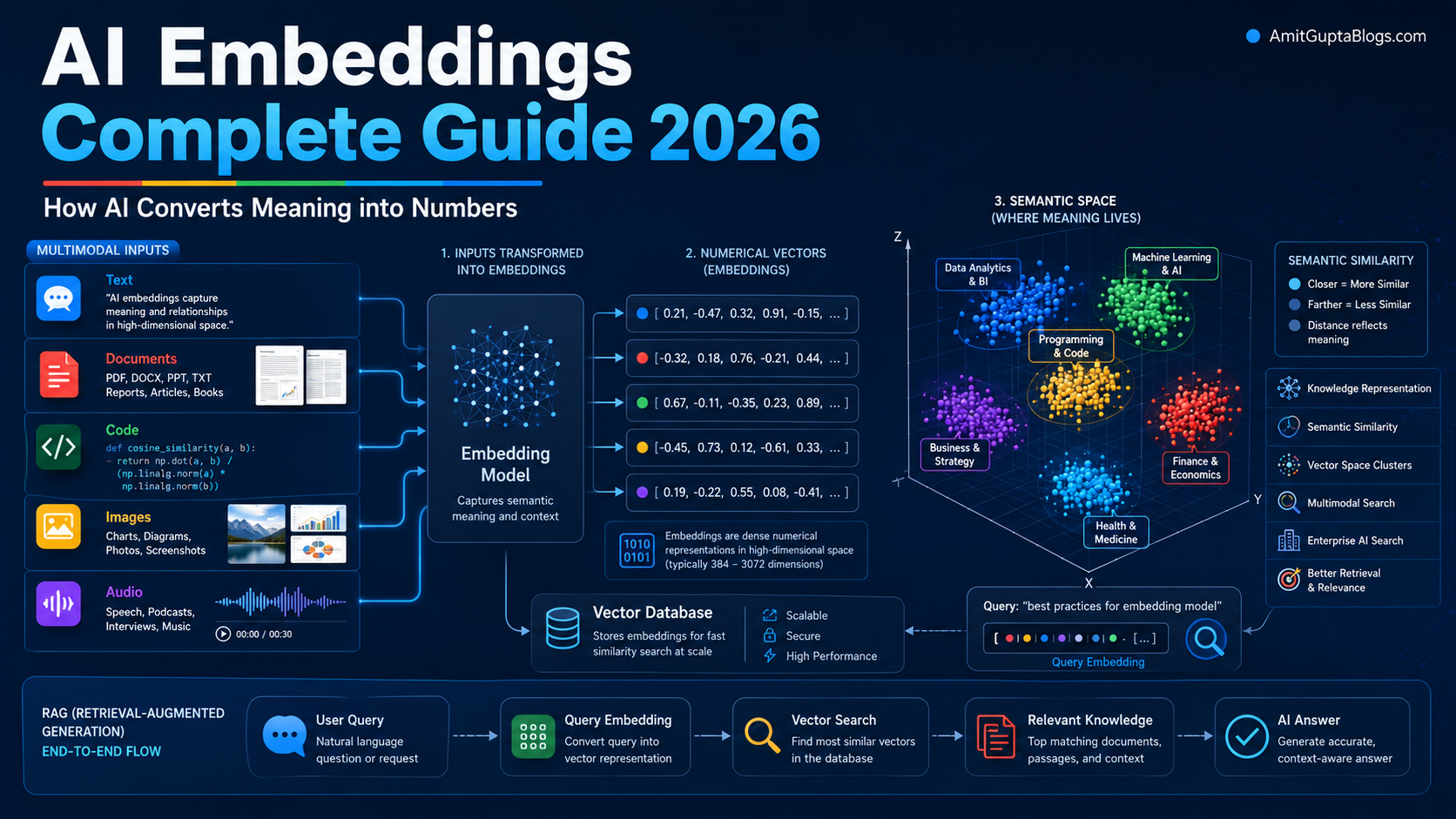
Imagine typing this question into an AI assistant:
“Can I claim internet expenses while working from home?“
The system does not only search for those exact words. It converts your question into a numerical representation, compares its meaning with stored company policies or tax documents, and retrieves the passages that are conceptually closest to what you asked.
Those numerical representations are called AI embeddings.
AI Embeddings are one of the least visible but most important building blocks in modern artificial intelligence. They help AI systems search by meaning, recommend relevant products, find similar images, retrieve source documents for RAG, organise enterprise knowledge and connect user requests with the right tools or actions.
Once you understand embeddings, technologies such as semantic search, vector databases and retrieval-augmented generation become much easier to understand.
Table of Contents
Who Should Read This Guide?
This guide is useful for:
- Beginners trying to understand how AI processes meaning
- Developers building search, RAG or recommendation applications
- Product managers evaluating enterprise AI platforms
- UI/UX designers creating AI-assisted search experiences
- Business leaders exploring internal knowledge assistants
- Data and AI teams comparing embedding models
- Students learning about vector representations
- Anyone who wants to understand what happens between a user question and an AI-generated answer
No advanced mathematical background is required.
Key Takeaways
- AI embeddings convert text, images, code, audio, video and documents into numerical vectors.
- Similar concepts generally receive vectors positioned closer together in an embedding space.
- AI Embeddings enable semantic search, recommendations, clustering, classification and RAG retrieval.
- Tokens are the pieces a model reads; AI embeddings are numerical representations of meaning.
- An embedding model creates vectors, while a vector database stores, indexes and searches them.
- Larger embedding dimensions can preserve more information, but they also increase storage, latency and computational requirements.
- Chunking quality, metadata, model selection and evaluation often matter more than simply choosing the largest embedding model.
- There is no universally best embedding model. The correct choice depends on language, domain, modality, cost, latency, privacy and retrieval quality.
- AI Embeddings should be protected as potentially sensitive derived data rather than treated as automatically anonymous.
- Production systems increasingly combine embeddings with keyword search, reranking, metadata filters and access controls.
What Are AI Embeddings?
AI embeddings are numerical representations of information designed to preserve meaningful relationships between items.
An embedding model can take an input such as the following:
- A word
- A sentence
- A document
- An image
- A piece of source code
- An audio recording
- A video
- A customer profile
- A product description
It then converts that input into a list of numbers called a vector.
For example, a sentence might be represented in a highly simplified form like this:
"Employees may claim home-office internet expenses."

   ↓

[0.021, -0.381, 0.744, 0.118, -0.092, ...]
A real embedding may contain hundreds or thousands of numbers rather than five.
The individual numbers usually do not have simple human-readable labels. One number does not necessarily mean “internet”, another “employee”, and another “expense”. Meaning is distributed across the vector.
What matters is the vector’s position relative to other vectors.
Google describes AI embeddings as lower-dimensional representations that preserve meaningful relationships between items, while AWS and IBM similarly define them as numerical representations of real-world objects placed in semantically meaningful vector spaces.
Why Embeddings Matter in Modern AI
Traditional software is good at working with exact values. It can determine that:
Employee ID 1024 = Employee ID 1024
But human language rarely works through exact matches.
Consider these statements:
- “How do I get reimbursed for broadband?”
- “Can I claim home internet costs?”
- “Does the company pay for Wi-Fi used for remote work?”
The words are different, but the intent is nearly the same.
A keyword system may fail because “broadband”, “internet” and “Wi-Fi” are not identical strings. An embedding-based system can place these questions close together because their meanings are related.
This capability supports:
- Semantic search
- Enterprise knowledge retrieval
- Product recommendations
- Similar-content discovery
- Customer-support routing
- Duplicate detection
- Document clustering
- Intent classification
- AI-agent memory
- RAG document retrieval
- Cross-modal search
Embeddings provide a mathematical bridge between unstructured human information and software systems that require numerical inputs.
Why AI Needs Numbers to Understand Meaning
Computers ultimately perform calculations on numbers.
A machine cannot directly calculate the distance between the following:
"annual leave policy"
and:
"how many vacation days do employees receive?"
It first needs a numerical representation of each phrase.
Once both phrases are converted into vectors, the system can calculate how closely they point in the same direction or how near they are within a multidimensional space.
The system is not understanding meaning exactly as a human does. Instead, it has learned statistical patterns that allow related concepts to receive similar representations.
This is why embeddings are better described as learned representations of meaning rather than miniature definitions stored inside a model.
How Text Becomes an Embedding
A simplified text-embedding pipeline looks like this:
- Input text is received:
"How can I reset my company password?" - The text is tokenised: The sentence is divided into units the model can process. These may be complete words, word fragments, punctuation marks or special tokens.
- The embedding model processes the tokens: A neural network, commonly based on transformer architecture, analyses relationships among the tokens and their surrounding context.
- Contextual features are combined: The model produces a representation for the complete sentence, paragraph or document chunk.
- A fixed-length vector is returned:
[0.073, -0.114, 0.512, ...]
The same model can then be used to create embeddings for knowledge-base articles, policy documents and user queries.
Visual Diagram Suggestion: Text to Embedding Vector
Text Input
"How can I reset my password?"
          ↓
Tokenisation
          ↓
Embedding Model
          ↓
Embedding Vector
[0.073, -0.114, 0.512, ...]
What Does an Embedding Vector Look Like?
A vector is an ordered list of numbers.
A simplified three-dimensional vector might look like:
[0.24, -0.67, 0.81]
Modern production embeddings commonly contain hundreds or thousands of dimensions:
[0.0241, -0.1874, 0.3318, 0.0927, ..., -0.0152]
Each dimension contributes to the model’s overall representation of the input.
It is tempting to imagine that each dimension represents one understandable feature, such as topic, sentiment or language. In practice, individual dimensions are usually not directly interpretable. Meaning emerges from the pattern across the complete vector.
Simple Example of Semantic Similarity
Suppose an embedding model processes these three sentences:
A. "The employee wants to work from home."

B. "The staff member requested remote working."

C. "The customer wants to return a damaged laptop."
A and B discuss similar concepts, so their vectors may be close together.
C discusses a different subject, so its vector may be farther away.
A simplified similarity result might be the following:
| Comparison | Illustrative Similarity |
|---|---|
| A compared with B | 0.91 |
| A compared with C | 0.34 |
| B compared with C | 0.29 |
These scores are illustrative. Real similarity scores depend on the embedding model, normalisation, metric and data.
The important concept is that the model compares semantic relationships, not only shared words.
Visual Diagram Suggestion: Semantic Similarity Map
Remote Work Cluster

● Work from home
● Remote working request
● Hybrid-work permission


Product Returns Cluster

● Damaged laptop return
● Replacement request
● Refund for broken device
Suggested graphic prompt: Create a semantic vector-space map with related workplace-policy phrases clustered together and unrelated product-return phrases placed in a separate cluster. Use clean, labelled points; subtle grids; and an educational AI infrastructure style.
AI Embeddings vs Keywords
Keyword search looks for words or predefined variations. Embedding search looks for vectors that represent related meanings.
| Area | Keyword Search | Embedding-Based Search |
|---|---|---|
| Main matching method | Exact or approximate word matching | Semantic vector similarity |
| Handles synonyms | Requires rules, dictionaries or query expansion | Often recognises related concepts automatically |
| Exact product codes | Usually excellent | May be unreliable without keyword support |
| Natural-language questions | Limited without additional processing | Generally well suited |
| Misspellings | Depends on search configuration | May tolerate some variation |
| Explainability | Easier to inspect | Similarity can be harder to explain |
| Best use | Names, codes, dates and exact terminology | Concepts, intent and meaning |
| Common production approach | Combined with vector search | Combined with keyword search |
Embeddings should not automatically replace keywords.
An enterprise search POL-HR-1042 needs exact matching. A query such as “Can new parents take additional leave?” benefits from semantic retrieval.
For this reason, many production systems use hybrid search, combining lexical relevance with vector similarity.
AI Embeddings vs Tokens
Tokens and embeddings are related, but they are not the same.
| Tokens | Embeddings |
|---|---|
| Units into which input is divided | Numerical representations produced from input |
| Used to process text inside a model | Used to compare, retrieve, classify or cluster information |
| Maybe words, subwords or punctuation | Usually fixed-length vectors |
| Token count affects model limits and cost | Vector dimensions affect storage and search computation |
| Do not directly represent a complete document’s meaning | Can represent a word, sentence, chunk, document or other item |
| Exist before or during model processing | Produced through model processing |
A sentence may contain 12 tokens but produce one 768-dimensional embedding.
Tokens answer:
“What pieces will the model process?“
Embeddings answer:
“How can the meaning of this input be represented numerically?“
Embeddings vs Vector Databases
An embedding model and a vector database perform different jobs.
| Embedding Model | Vector Database |
|---|---|
| Converts information into vectors | Stores and indexes vectors |
| Learns semantic representations | Executes similarity searches |
| Processes text, images or other supported inputs | Manages vector records and metadata |
| Determines the shape and meaning of the vector space | Finds nearby vectors efficiently |
| May be accessed through an API or run locally | May be managed, self-hosted or integrated into another database |
| Does not replace a storage layer | Does not normally create high-quality embeddings by itself |
A useful analogy is:
The embedding model creates coordinates. The vector database stores those coordinates and finds nearby points.
For a deeper explanation of indexing, approximate nearest-neighbour search, metadata filtering and vector-storage architecture, read the Vector Databases Complete Guide 2026 listed in the internal linking section.
How Embeddings Power Semantic Search
Semantic search generally follows these steps:
- Documents are collected.
- Documents are cleaned and divided into searchable chunks.
- Each chunk is converted into an embedding.
- The embedding and related metadata are stored.
- A user enters a natural-language query.
- The query is converted into an embedding using a compatible model.
- The system compares the query vector with stored vectors.
- The closest matching chunks are returned.
- Results may be filtered, combined with keyword results or reranked.
Query Embedding vs Document Embeddings
User Query
"Can I claim Wi-Fi expenses?"
          ↓
Query Embedding
          ↓
Similarity Comparison
          ↓
┌──────────────────────────────────────┐
│ Document A: Remote Work Policy       │  High similarity
│ Document B: Expense Reimbursement    │  High similarity
│ Document C: Office Parking Rules     │  Low similarity
└──────────────────────────────────────┘
Suggested graphic prompt: Show a query vector being compared against multiple document vectors, with the two most semantically relevant documents highlighted and an unrelated document positioned farther away.
How Embeddings Work Inside RAG Systems
Retrieval-augmented generation connects a language model with external information.
AI Embeddings usually support the retrieval stage.
A basic RAG workflow is:
Enterprise Documents
          ↓
Chunking
          ↓
Embedding Model
          ↓
Vector Database
          ↓

User Question
          ↓
Query Embedding
          ↓
Similarity Search
          ↓
Relevant Document Chunks
          ↓
Prompt Augmentation
          ↓
Large Language Model
          ↓
Grounded Answer
The embedding model does not normally write the final answer. It helps identify the information that should be given to the generative model.
If retrieval selects irrelevant chunks, even an advanced language model may produce a weak, incomplete or misleading answer.
This makes embedding quality, chunking, metadata and retrieval evaluation fundamental parts of a production RAG system.
For the full architecture, limitations, retrieval methods and enterprise implementation considerations, see the Retrieval-Augmented Generation (RAG) Complete Guide 2026 in the internal-linking section.
Visual Diagram Suggestion: AI Embeddings Inside RAG
Suggested graphic prompt: Create a premium RAG pipeline diagram showing enterprise documents becoming chunks, chunks becoming embeddings, vectors entering a vector database, a user query becoming a query embedding, relevant chunks being retrieved, and an LLM producing a grounded answer.
How Embeddings Work with Vector Databases
A vector database record might contain:
{
  "id": "policy-remote-work-04",
  "vector": [0.021, -0.381, 0.744, 0.118],
  "metadata": {
    "department": "Human Resources",
    "document_type": "Policy",
    "region": "India",
    "access_level": "Employees",
    "updated_at": "2026-05-14"
  },
  "text": "Employees may claim approved internet expenses..."
}
When a query arrives, the database searches for vectors near the query vector.
It may also apply metadata filters:
department = Human Resources
region = India
access_level = Employees
This prevents a mathematically similar but operationally inappropriate result from being retrieved.
Visual Diagram Suggestion: Embeddings Stored in a Vector Database
Document Chunk
      ↓
Embedding Model
      ↓
Vector + Metadata + Source Text
      ↓
Vector Database Index
      ↓
Nearest-Neighbour Retrieval
Suggested graphic prompt: Show multiple document chunks converted into vectors and stored in a modern vector database alongside metadata cards for department, date, security level and source document.
Text Embeddings Explained
Text embeddings represent linguistic information numerically.
Depending on the model and application, an embedding may represent the following:
- A word
- A search query
- A sentence
- A paragraph
- A support ticket
- A product description
- A document chunk
- An entire document
- A code comment
- A conversation turn
Modern text embeddings are usually contextual.
The word “bank” in the following statement:
"I deposited money in the bank."
has a different meaning from “bank” in this:
"We sat on the river bank."
Contextual models use surrounding words to create representations appropriate to each usage.
Text embeddings are used for:
- Semantic search
- Duplicate detection
- Intent routing
- Sentiment and topic classification
- Recommendations
- Document organisation
- RAG retrieval
- Similar-question matching
- Knowledge-base navigation
Document Embeddings Explained
A document embedding attempts to represent a complete document or a meaningful section of it.
Creating one vector for a short article may work reasonably well. Creating one vector for a 150-page policy manual is more problematic because multiple subjects are compressed into one representation.
A long document may discuss:
- Eligibility
- Approvals
- Reimbursement
- Security
- Regional exceptions
- Compliance requirements
A single vector may blur these distinctions.
Production systems therefore commonly divide long documents into chunks and create separate embeddings for each chunk.
Document-level embeddings can still be useful for:
- High-level clustering
- Related-document recommendations
- Topic classification
- Initial candidate selection
- Organising large repositories
Chunk-level embeddings are usually more precise for question answering.
Image Embeddings Explained
An image embedding converts visual content into a vector.
The vector may capture patterns related to the following:
- Objects
- Scenes
- Shapes
- Colours
- Composition
- Visual style
- Text visible in the image
- Relationships between visual elements
Image embeddings support:
- Similar-image search
- Duplicate-image detection
- Product discovery
- Visual recommendations
- Asset-library organisation
- Content moderation
- Screenshot retrieval
- Design-reference discovery
For example, a furniture marketplace could allow a user to upload a photograph of a wooden chair and retrieve visually related products without requiring the user to describe every detail.
Code Embeddings Explained
Code embeddings represent source code, functions, documentation or developer queries numerically.
They can help an AI coding assistant answer questions such as:
- “Where is user authentication implemented?”
- “Find functions that validate email addresses.”
- “Show similar API-handling logic.”
- “Which module generates the monthly report?”
- “Find code related to password reset.”
A general text model may process code, but models optimised for code retrieval can better capture relationships involving:
- Programming syntax
- Functionality
- API usage
- Variable relationships
- Comments and documentation
- Similar implementation patterns
A code-search system should usually retain filenames, repository paths, programming language, branch, commit and access permissions as metadata.
Multimodal Embeddings Explained
Multimodal embeddings place different forms of information into a shared or aligned vector space.
A multimodal model may accept the following:
- Text
- Images
- Audio
- Video
- PDF pages
- Screenshots
- Slides
- Mixed text-and-image documents
This enables searches across formats.
Examples include:
- Using text to find an image
- Using an image to find a product description
- Using a screenshot to find a related presentation
- Using an audio clip to retrieve a video segment
- Searching PDFs by both visual layout and written content
Google’s Gemini Embedding 2 maps text, images, audio, video and PDF content into a shared embedding space. Google released the model as generally available in April 2026. Its documentation lists a default vector size of 3,072 dimensions and supports reduced output dimensionality.
Cohere Embed v4.0 supports text, images and mixed text-image content such as PDFs, while Voyage and Jina also offer multimodal models intended for document and cross-modal retrieval.
Multimodal embeddings are especially valuable when important information cannot be captured reliably through text extraction alone, such as the following:
- Diagrams
- Charts
- Product photographs
- Slide layouts
- Scanned documents
- Interface screenshots
- Video scenes
Embedding Dimensions Explained Simply
The number of values in an embedding vector is its dimensionality.
Examples include:
- 256 dimensions
- 384 dimensions
- 768 dimensions
- 1,024 dimensions
- 1,536 dimensions
- 3,072 dimensions
A higher-dimensional vector provides the model with more numerical capacity to represent information. However, higher dimensions are not automatically better for every application.
Higher dimensions generally mean:
- More storage
- More memory use
- More data transferred through APIs
- More similarity-comparison work
- Potentially higher indexing costs
Lower dimensions generally can have the following meanings:
- Smaller indexes
- Faster comparisons
- Lower storage costs
- Easier deployment on constrained infrastructure
- Possible loss of retrieval quality
For one million vectors stored as 32-bit floating-point values:
1,000,000 × 768 × 4 bytes
≈ 3.07 GB
That calculation excludes metadata and index overhead.
Several current embedding services support adjustable vector sizes. OpenAI’s text-embedding-3 models support shortened embeddings; Google recommends selected output sizes for Gemini embeddings; Cohere Embed v4.0 offers multiple dimensions; and Voyage 4 models provide configurable vector sizes.
Let’s take an example of the practical lesson:
Select dimensions through evaluation, not assumption.
Measure retrieval quality at several supported dimensions before accepting the cost of the largest vector.
Similarity Scores Explained
A similarity score estimates how closely two vectors are related.
The score may be calculated using:
- Cosine similarity
- Dot product
- Euclidean distance
- Manhattan distance
- Provider-specific or index-specific methods
A higher score often indicates greater similarity, but score interpretation depends on the selected metric and implementation.
A score of “0.82” is not universally “good“. It may be excellent in one embedding space and ordinary in another.
Production teams should create labelled examples of:
- Relevant matches
- Partially relevant matches
- Irrelevant matches
- Difficult edge cases
These examples can be used to establish meaningful thresholds for a particular application.
Cosine Similarity Explained for Beginners
Cosine similarity compares the direction of two vectors rather than simply measuring their absolute size.
Imagine two arrows:
- Arrows pointing in nearly the same direction are similar.
- Arrows pointing in unrelated directions are less similar.
- Arrows pointing in opposite directions are dissimilar.
The formula is:
cosine similarity =
(A · B) / (|A| × |B|)
Where:
A · Bis the dot product|A|is the magnitude of vector A|B|is the magnitude of vector B
For beginners, the formula is less important than the concept:
Cosine similarity asks whether two vectors point in a similar semantic direction.
Normalisation matters because it makes vector direction more important than magnitude. Some embedding APIs return normalised vectors automatically, while others require developers to handle normalisation under specific configurations. Google, for example, documents automatic normalisation for reduced-dimensional Gemini Embedding 2 vectors and different behaviour for its earlier embedding model.
Chunking and Embeddings
Chunking divides documents into smaller searchable units before embeddings are created.
Consider this policy:
Remote Work Policy
- Eligibility
- Equipment
- Internet reimbursement
- Data security
- Manager approval
Creating one embedding for the entire policy may reduce retrieval precision. Creating a separate embedding for each sentence may remove too much context.
Effective chunks should be:
- Large enough to preserve meaning
- Small enough to isolate the relevant topic
- Structured around headings or sections
- Linked to their source document
- Accompanied by useful metadata
Common Chunking Methods
| Method Name | Description |
|---|---|
| Fixed-size chunking | Text is divided according to token or character count. |
| Sentence-based chunking | Chunks are created at sentence boundaries. |
| Paragraph-based chunking | Each paragraph becomes a candidate retrieval unit. |
| Structure-aware chunking | Headings, lists, sections, tables and document layout guide the chunk boundaries. |
| Semantic chunking | The system detects topic transitions and creates chunks around meaning. |
| Contextual chunking | Additional document context, such as title or section hierarchy, is included when creating the embedding. |
My Practical Perspective
From a product-design viewpoint, chunking is not only a backend decision. It directly affects the user experience.
A retrieved passage must contain enough context for the user to understand:
- Where it came from
- What section it belongs to
- Whether an exception applies
- When it was last updated
- Whether the user has permission to rely on it
A technically relevant fragment without usable context can still create a poor AI experience.
Metadata and Embeddings
Embeddings represent semantic relationships. Metadata represents explicit facts and operational constraints.
Useful metadata may include:
- Document title
- Department
- Product
- Region
- Language
- Author
- Publication date
- Revision date
- Security classification
- User-access group
- Content type
- Repository
- File path
- Customer account
- Source URL
Metadata improves retrieval by allowing the system to apply filters before or during similarity search.
For example:
Query:
"What is the maternity leave entitlement?"

Metadata filters:
country = India
document_status = Current
department = Human Resources
access_group = Employees
Without these filters, a semantically similar policy from another region or an outdated document may be returned.
Embeddings answer:
“Which content is similar?“
Metadata answers:
“Which similar content is valid for this user and situation?“
Embeddings in AI Agents
AI agents need to decide what information, memory, tool or action is relevant to a goal.
Embeddings can support the following tasks:
- Long-term memory retrieval
- Similar-task discovery
- Tool selection
- Intent routing
- Example retrieval
- Policy lookup
- Workflow matching
- Knowledge retrieval
- Duplicate-action prevention
- Agent-to-agent capability discovery
For example, an enterprise agent receives the following prompt:
"Prepare the current quarter’s regional sales comparison."
Embeddings may help the system identify the following pattern:
- A similar past report
- The correct analytics tool
- Relevant data definitions
- Regional access policies
- A reporting template
- Previous user preferences
Embeddings do not make an agent autonomous by themselves. They improve the agent’s ability to locate context and make better routing decisions.
Embeddings in Enterprise AI Search
Enterprise search is more demanding than a public demonstration.
An internal system must handle:
- Multiple repositories
- Duplicate documents
- Conflicting versions
- Department-specific terminology
- Permission boundaries
- Regional policies
- Tables and scanned files
- Frequent updates
- Audit requirements
- Sensitive information
A useful enterprise retrieval pipeline typically consists of:
User Query
    ↓
Query Understanding
    ↓
Keyword Retrieval + Vector Retrieval
    ↓
Metadata and Permission Filters
    ↓
Candidate Fusion
    ↓
Reranking
    ↓
Relevant Passages
    ↓
Answer with Sources
The embedding model is one component in a larger relevance system.
Company Policy Search Example
A user asks:
“Will the organisation reimburse an ergonomic chair for home working?“
The system is able to retrieve:
- Remote Work Equipment Policy
- Health and Safety Guidelines
- Expense Approval Matrix
- Region-specific reimbursement limits
A good experience should show the answer, relevant excerpts, source documents, revision dates and applicable conditions.
Enterprise Knowledge Assistant Example
A project manager asks:
“What did we learn from previous launches involving payment-system migration?“
Semantically related objects can be found by embeddings:
- Retrospectives
- Risk registers
- Architecture decisions
- Support incidents
- Project notes
This is far more useful than searching only for documents containing the exact phrase “payment system migration”.
Popular Embedding Models and Services in 2026
The embedding market changes quickly. The models below represent prominent options documented as available in July 2026. Availability, pricing and regional access should be verified before production deployment.
| Provider or Ecosystem | Current Models or Services | Modalities | Practical Positioning |
|---|---|---|---|
| OpenAI | text-embedding-3-small, text-embedding-3-large | Text and code-oriented content | Managed API, adjustable dimensions, and convenient for existing OpenAI applications. The large model supports up to 3,072 dimensions. |
| Google Gemini API | gemini-embedding-2, gemini-embedding-001 | Text; Embedding 2 also supports images, audio, video and PDFs | Useful for Google AI applications and cross-modal retrieval. Gemini Embedding 2 became generally available in April 2026. |
| Google Cloud / Vertex AI | Gemini embedding models and managed embedding APIs | Text and multimodal inputs | Enterprise deployment with Google Cloud identity, governance, regional and platform controls. |
| Cohere | embed-v4.0, Embed v3 multilingual and English variants | Text, images and mixed text-image inputs | Strong enterprise-search positioning, multilingual options and selectable vector dimensions. Embed v4.0 documents a 128K context length. |
| Voyage AI | Voyage 4 family, code and domain-specific models, multimodal models | Text, code and rich multimodal documents | Offers general, multilingual, code, legal and finance-oriented retrieval options with configurable dimensions. |
| Jina AI | Jina Embeddings v5 text and omni families, v4 and code models | Text, images, audio and video depending on model | Open and API-accessible search models, including multilingual and multimodal retrieval. Jina’s v5 omni model places supported modalities in a shared space. |
| Sentence Transformers | Open-source library with many community and research models | Primarily text, with support for additional modalities depending on model | Useful for local deployment, experimentation, fine-tuning, reranking and open-model evaluation. |
Important Comparison Warning
Provider benchmarks are not directly comparable unless they use the same:
- Dataset
- Task
- Query-document format
- Chunking approach
- Evaluation metric
- Vector dimensions
- Language mix
- Retrieval index
- Reranking configuration
A model advertised as stronger on a general benchmark may perform worse on your company’s policy documents, product catalogue or source-code repository.
Practical Use Cases of Embeddings
| Use Case | What Gets Embedded | What Similarity Helps Find |
|---|---|---|
| Company policy search | Policies, procedures and user questions | Relevant rules despite different wording |
| Customer-support chatbot | Help articles and support queries | Answers to semantically similar problems |
| Product recommendations | Product descriptions, images and user behaviour | Related or complementary products |
| AI coding assistant | Source code, comments and developer questions | Relevant functions and implementation patterns |
| RAG assistant | Document chunks and user queries | Evidence for grounded answers |
| Similar-image search | Product, design or asset images | Visually or conceptually related images |
| Enterprise knowledge assistant | Reports, decisions, notes and lessons learned | Relevant organisational knowledge |
| Duplicate detection | Articles, tickets or records | Near-duplicate or paraphrased content |
| Intent routing | User requests and known intent examples | Correct workflow, agent or support team |
| Content clustering | Documents, feedback or messages | Natural topic groupings |
Customer Support Chatbot Example
A customer types:
“The verification link is no longer working.”
The title of the supporting article might be:
“What to do when your account activation email expires.“
The wording is different, but embeddings can connect the shared meaning.
Product Recommendation Example
A customer views:
“Minimal oak desk for small home offices.“
Embeddings can find related products by:
- Material
- Style
- Room type
- Intended use
- Size requirements
This can supplement behavioural recommendations such as “customers who bought this also bought”.
AI Coding Assistant Example
A developer asks:
“Where do we refresh the authentication token after an API failure?“
Code embeddings can retrieve relevant functions even when the code uses terms such as:
renewSession()
retryUnauthorizedRequest()
rotateAccessCredential()
Similar Image Search Example
A designer uploads a screenshot of a clean analytics dashboard.
Image embeddings can retrieve:
- Similar dashboard layouts
- Related component libraries
- Matching visual references
- Alternative data-visualisation screens
Common Mistakes When Using Embeddings
| Mistake | Why It Causes Problems | Better Approach |
|---|---|---|
| Using one vector for a very long document | Multiple subjects become compressed into one representation | Chunk documents around meaningful sections |
| Assuming the largest model is always best | Cost and latency increase without guaranteed domain improvement | Evaluate several models on labelled queries |
| Ignoring keyword search | Exact identifiers, names and codes may be missed | Use hybrid keyword and vector retrieval |
| Mixing embeddings from incompatible models | Vectors belong to different spaces and cannot be compared reliably | Re-embed the full collection with one compatible model |
| Changing vector dimensions without rebuilding the index | Stored and query vectors no longer match | Version models and indexes together |
| Ignoring query/document instructions | Some models treat queries and documents differently | Follow provider guidance for task or input types |
| Storing no metadata | Results cannot be filtered by access, region or status | Store structured metadata with every vector |
| Embedding outdated documents | Old policies may rank above current ones | Track revisions and remove or demote obsolete content |
| Evaluating only a few easy queries | Retrieval appears better than it is | Build a representative test set with edge cases |
| Treating similarity as factual correctness | A similar passage may still be wrong for the user | Validate permissions, dates, source authority and context |
| Returning too many chunks | The LLM receives noise and conflicting information | Retrieve candidates and rerank a smaller set |
| Assuming embeddings are anonymous | Derived vectors may still reflect sensitive source information | Apply encryption, access control and lifecycle governance |
How to Choose the Right Embedding Model
Do not begin by asking:
“Which model ranks first?”
Begin by asking:
“Which model performs best for my data, users and constraints?”
1. Define the Retrieval Task
Clarify whether you need:
- Query-to-document retrieval
- Sentence similarity
- Clustering
- Classification
- Recommendation
- Code search
- Image search
- Cross-modal retrieval
- Long-document retrieval
A model optimised for clustering may not be the strongest choice for asymmetric question-to-document search.
2. Identify Your Languages
Test the languages your users actually use.
An English-focused model may be unsuitable when documents contain Hindi, German, Japanese or multilingual business terminology.
3. Examine Your Content Types
Determine whether the system must process:
- Plain text
- Source code
- Tables
- Screenshots
- Scanned PDFs
- Slides
- Images
- Audio
- Video
A text-only pipeline may discard important visual or structural information.
4. Measure Retrieval Quality
Create a test set containing:
- Real user queries
- Expected relevant documents
- Difficult paraphrases
- Exact identifiers
- Ambiguous requests
- Negative examples
- Region-specific questions
- Permission-sensitive questions
Useful retrieval metrics include:
- Recall at K
- Precision at K
- Mean reciprocal rank
- Normalised discounted cumulative gain
- Human relevance ratings
- End-to-end answer accuracy
5. Compare Cost and Latency
Measure:
- Embedding generation cost
- Index-storage cost
- Query latency
- Re-embedding cost
- Network transfer
- Batch-processing availability
- Local infrastructure requirements
6. Test Multiple Dimensions
When supported, compare smaller and larger output dimensions.
A smaller vector may deliver almost identical retrieval quality at a substantially lower storage cost.
7. Consider Deployment and Governance
Ask:
- Can data leave the organisation?
- Is regional processing required?
- Is private networking available?
- Can the model run locally?
- Are audit logs required?
- How are deletion requests handled?
- What is the provider’s model-lifecycle policy?
8. Evaluate Model Stability
Changing embedding models generally requires re-embedding the indexed collection.
Record:
- Provider
- Model ID
- Model version
- Dimensions
- Normalisation method
- Input or task type
- Chunking version
- Index version
Treat these settings as part of the application’s data schema.
Security, Privacy and Governance for Embeddings
Embeddings should not be treated as automatically harmless simply because they are numerical.
They may preserve meaningful signals from:
- Confidential documents
- Customer conversations
- Employee records
- Proprietary code
- Medical or financial information
- Internal strategy documents
A responsible enterprise implementation should include:
Access Control
Apply source-document permissions during retrieval. A user should not retrieve a confidential vector merely because it is semantically similar to the query.
Encryption
Protect embeddings:
- In transit
- At rest
- In backups
- During replication
Data Minimisation
Do not embed data that the application does not need.
Remove unnecessary things:
- Personal identifiers
- Secrets
- Credentials
- Tracking parameters
- Hidden document content
Retention and Deletion
When a source document is deleted or access is revoked, the associated
- Chunks
- Vectors
- Metadata
- Caches
- Derived indexes
should be updated or removed.
Tenant Isolation
Multi-customer systems should isolate vector collections or enforce reliable tenant filters.
Auditability
Record:
- Which source was retrieved
- Which user initiated the query
- Which filters were applied
- Which model and index versions were used
- Which passages were sent to the language model
Provider Review
Review each provider’s:
- Data-usage policy
- Retention policy
- Regional processing options
- Private deployment support
- Model-training policy
- Compliance certifications
OpenAI states that API data is not used to train its models by default, while Google’s embedding documentation emphasises that users retain responsibility for the data they submit and the resulting embeddings. Provider-specific terms should still be reviewed for the selected service and account configuration.
Current Best Practices for Production Embeddings
A reliable production system should:
- Use representative evaluation data. Test real queries instead of relying only on public benchmarks.
- Preserve document structure Include titles, headings and section paths when they improve chunk meaning.
- Use compatible query and document settings Follow model guidance for retrieval queries, retrieval documents or task instructions.
- Combine lexical and semantic retrieval Preserve exact matching for identifiers, names, dates and technical terms.
- Apply metadata and permission filters Semantic relevance must not bypass business rules.
- Rerank retrieved candidates: Vector search can generate a broad candidate set; a reranker can improve final ordering.
- Version the embedding pipeline: model, dimension, chunking and index changes should be traceable.
- Monitor retrieval quality Track unanswered questions, irrelevant sources and declining search success.
- Re-embed deliberately Do not switch models without planning index migration, testing and rollback.
- Keep source references Every retrieved chunk should retain its document identity and location.
- Separate retrieval from answer evaluation A weak answer may result from retrieval, prompting or generation. Measure these stages independently.
- Optimise for user trust Display citations, document dates, confidence indicators and links to original sources where appropriate.
Future of Embeddings
Embeddings are becoming more capable and more specialised.
Unified Multimodal Spaces
Models increasingly place text, images, audio, video and document pages into shared spaces. This will make enterprise search less dependent on converting every asset into plain text.
Google Gemini Embedding 2 and Jina’s 2026 omni-models are examples of this direction.
Context-Aware Chunk Representations
Embedding a passage together with document-level context can improve retrieval when a chunk is ambiguous on its own.
Voyage provides contextualised chunk embedding capabilities, while Jina has published work around late chunking and long-context retrieval.
Flexible and Compressed Vectors
Matryoshka-style and adjustable-dimensional embeddings allow teams to choose smaller vectors while preserving useful retrieval quality.
This helps reduce:
- Storage
- Search computation
- Network transfer
- Edge-device requirements
Domain-Specific Embeddings
More models are being optimised for:
- Code
- Finance
- Legal documents
- Scientific content
- Commerce
- Multilingual retrieval
Voyage, for example, documents separate code, finance and legal retrieval models alongside its general-purpose family.
Private and On-Device Embeddings
Open-weight models and smaller embedding architectures will make private, local and edge-based retrieval more accessible.
This is important for organisations that cannot send sensitive data to an external API.
Embeddings for Agentic Systems
As agents work across tools, documents and other agents, embeddings may increasingly help with:
- Capability discovery
- Memory retrieval
- Workflow matching
- Tool routing
- Similar-task planning
- Experience reuse
The future is unlikely to consist of one embedding model solving every problem. More often, applications will use carefully selected models, retrieval methods and indexes for different types of knowledge.
Final Thoughts
AI embeddings make unstructured information computationally searchable.
They allow AI systems to compare meanings rather than depend only on exact words. This capability powers semantic search, recommendations, vector retrieval, RAG assistants, code search, similar-image discovery, enterprise knowledge systems and AI-agent memory.
However, embeddings are not a complete AI architecture.
A successful implementation also requires:
- Thoughtful chunking
- Reliable metadata
- Permission-aware retrieval
- Vector indexing
- Keyword support
- Reranking
- Evaluation
- Governance
- User-friendly source presentation
From a product and user-experience perspective, the most important outcome is not whether a system produces mathematically elegant vectors.
The real question can be as follows:
Can the system help a user find the correct information, understand why it was selected and trust the result?
When embeddings are combined with good information architecture, responsible governance and strong retrieval design, they become one of the most practical foundations for building useful enterprise AI.
Frequently Asked Questions (FAQs)
1. What are AI embeddings?
AI embeddings are numerical vectors that represent the meaning or characteristics of information such as text, images, code, audio, video or documents. Similar items are generally positioned closer together in an embedding space.
2. Why do AI systems use embeddings?
AI systems use embeddings because computers need numerical inputs to calculate similarity, organise information, retrieve related content, classify items and make recommendations.
3. Are embeddings the same as tokens?
No. Tokens are the pieces into which input is divided for model processing. Embeddings are numerical representations produced from words, sentences, chunks, documents or other inputs.
4. What is the difference between embeddings and vector databases?
An embedding model converts information into vectors. A vector database stores, indexes, filters and searches those vectors.
5. How are embeddings used in RAG?
Documents are divided into chunks and converted into embeddings. A user query is also embedded. The system retrieves the most similar document chunks and provides them to a language model as grounding context.
6. What is semantic similarity?
Semantic similarity measures how closely two items are related in meaning. For example, “remote-work allowance” and “home-office reimbursement” may be semantically similar despite using different words.
7. What is cosine similarity?
Cosine similarity compares the direction of two vectors. Vectors pointing in similar directions are treated as more closely related.
8. Which embedding model is best in 2026?
There is no universally best model. The right choice depends on your data, language, modality, retrieval task, latency, cost, security and deployment requirements. Evaluate several models on real application queries.
9. Can embeddings store private information?
Embeddings are numerical rather than human-readable, but they should still be treated as potentially sensitive derived data. Apply encryption, access controls, retention policies and deletion workflows.
10. Are embeddings only used for text?
No. Modern embedding models can represent images, code, audio, video, PDF pages and mixed multimodal content.
Author Bio

Amit Gupta is a UI/UX Designer and Frontend Specialist with more than 20 years of experience in product design, design systems, Angular development, frontend architecture, and emerging technologies. Through AmitGuptaBlogs.com, he shares practical insights on AI, Google technologies, design workflows, development tools, and future technology trends.
References
- Pinecone’s explanation of vector embeddings
- Microsoft Azure AI Search vector search
- Jina embedding models
- Voyage AI embedding models
- OpenAI embedding models
- Vertex AI text embeddings documentation
2 thoughts on “AI Embeddings Complete Guide 2026: How AI Converts Meaning into Numbers”
Comments are closed.