
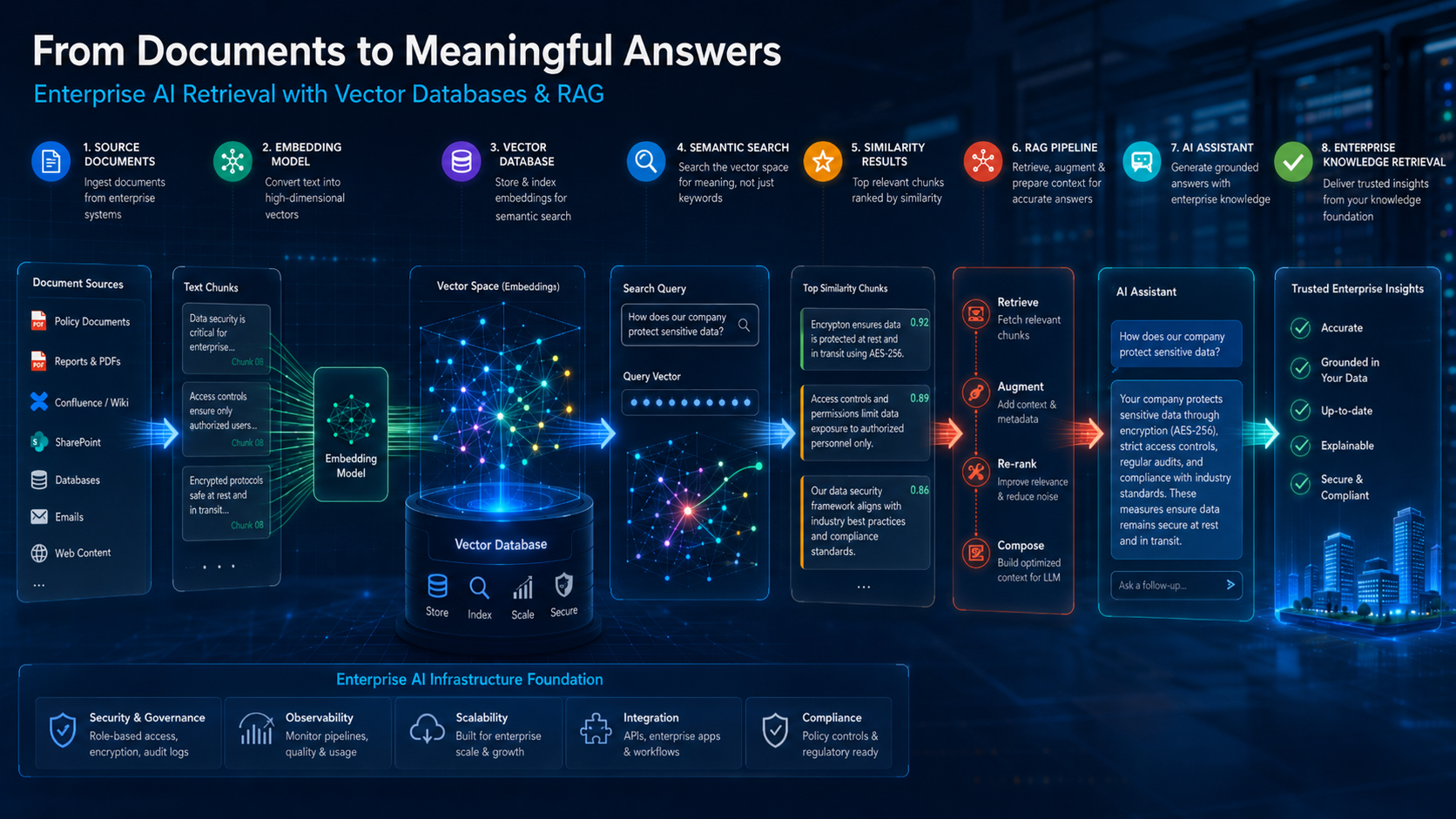
Imagine asking an AI assistant, “Which company policy explains remote work reimbursement?” The AI does not search for exact words only. It searches for meaning. It understands that your question may relate to travel allowance, hybrid work policy, expense claims, HR reimbursement rules, or finance approval guidelines. That is where Vector Databases come in.
Traditional search looks for matching words. Vector search looks for matching meaning.
In modern AI systems, especially Retrieval-Augmented Generation systems, vector databases work like a memory layer. They help AI applications find the most relevant documents, passages, product records, support tickets, code snippets, images, or knowledge chunks before the large language model generates an answer.
This guide explains vector databases from the ground up: what they are, how embeddings work, how vector search finds similar meaning, why hybrid search matters, and how vector databases fit into enterprise AI, RAG systems, and AI agents.
Table of Contents
Who Should Read This Guide?
This guide is useful for:
- Beginners trying to understand how AI search works
- Developers building RAG applications
- Product managers evaluating enterprise AI features
- Designers thinking about AI-powered user experiences
- AI learners studying embeddings and semantic search
- Business teams planning internal knowledge assistants
- Bloggers and creators explaining AI infrastructure in simple language
You do not need deep mathematics to understand this article. We will use practical examples, simple diagrams, and real-world use cases.
Key Takeaways
- A vector database stores data as numerical representations called embeddings.
- Embeddings help AI systems compare meaning, not just exact words.
- Vector search finds items that are semantically similar to a query.
- Similarity search is the core technique behind semantic search, recommendations, RAG, and many AI assistants.
- Traditional databases are still useful, but they are not designed for meaning-based retrieval.
- Production RAG usually needs more than vector search: metadata filtering, hybrid search, reranking, governance, freshness, and access control matter.
- Popular vector database options in 2026 include Pinecone, Weaviate, Milvus, Qdrant, Chroma, pgvector, Elasticsearch/OpenSearch vector search, and Google Vertex AI Vector Search.
- The best vector database depends on your use case, data size, latency needs, cloud preference, compliance requirements, developer experience, and existing architecture.
What Is a Vector Database?
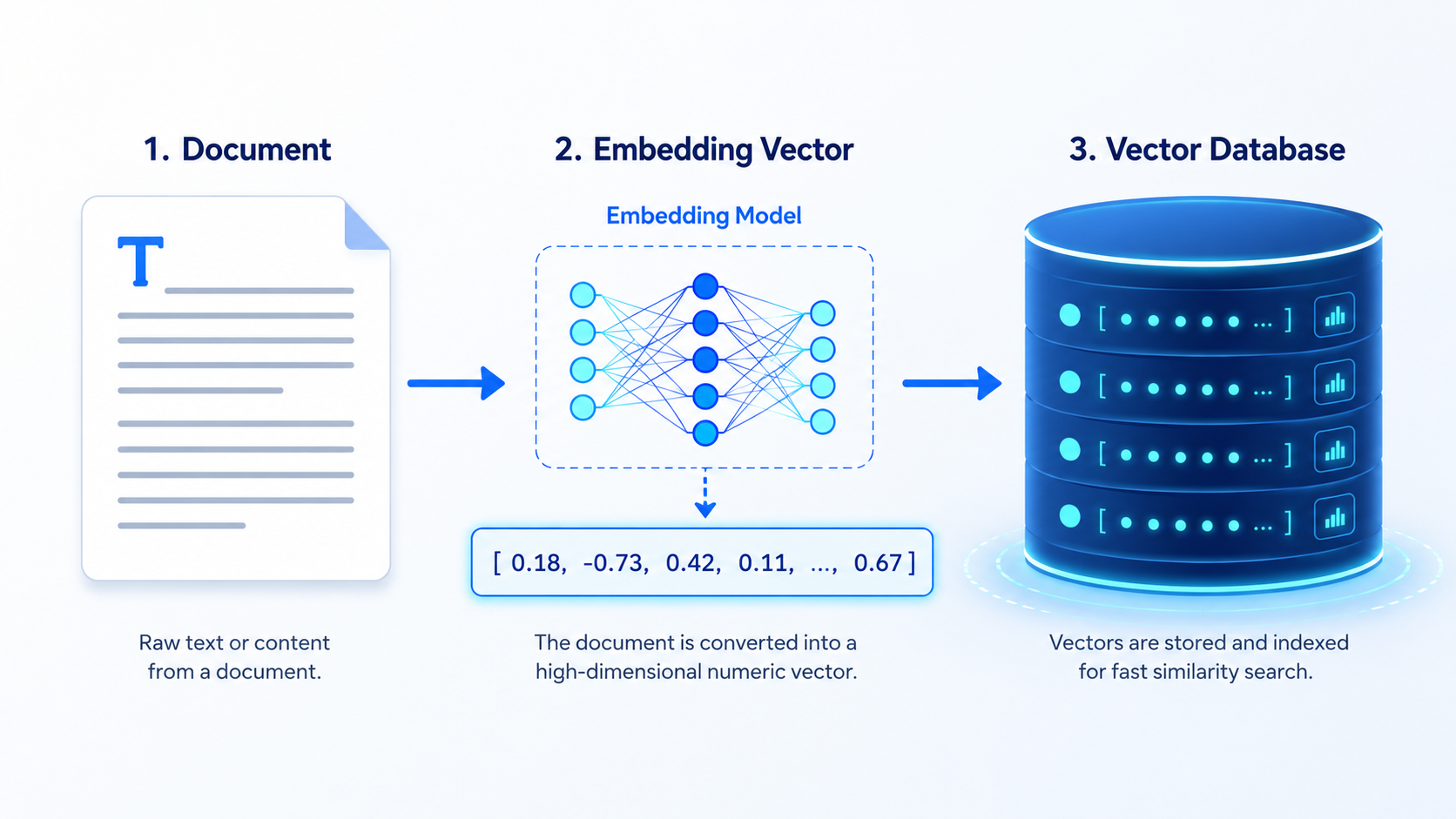
A vector database is a database designed to store, index, and search high-dimensional vectors.
A vector is simply a list of numbers.
For example:
Remote work reimbursement policy
→ [0.21, -0.45, 0.87, 0.11, -0.08, ...]
These numbers are generated by an embedding model. The vector does not store the visible words. It stores the meaning pattern learned by the model.
In a normal database, you may search by:
WHERE title = "remote work policy"
In a vector database, you search by meaning:
Find documents closest in meaning to:
"Can I claim internet expenses while working from home?"
The vector database compares the query vector with stored document vectors and returns the most similar results.
Official Pinecone documentation describes semantic search as searching dense vectors for records most similar in meaning and context to a query.
Why Vector Databases Matter in AI
Vector databases matter because AI applications need context.
A large language model can generate fluent answers, but it does not automatically know your private company documents, updated policies, customer support history, internal codebase, or product catalogue. A vector database helps the AI system retrieve relevant information before answering.
This is important for:
- RAG assistants
- Enterprise search
- AI chatbots
- Document Q&A
- Product recommendations
- Similar image search
- Customer support automation
- AI coding assistants
- Knowledge management systems
- AI agents that need memory and tools
Without retrieval, an AI system may guess. With good retrieval, it can ground its answer in relevant data.
This is why vector databases became one of the most important infrastructure layers behind practical AI systems.
Why Traditional Databases Are Not Enough for AI Search
Traditional databases are excellent for structured data.
They can answer questions like the following:
- Which customer has ID 1024?
- What orders were placed after 1 January 2026?
- Which invoices are unpaid?
- Which employees belong to the design team?
But they struggle with questions like the following:
- Which document explains this issue, even if the wording is different?
- Which customer complaints are similar to this new ticket?
- Which product looks similar to this image?
- Which internal code file relates to this error message?
- Which knowledge base article answers this user’s intent?
Traditional databases are built around exact values, rows, columns, relationships, and indexes. AI search needs meaning, similarity, and context.
That does not mean traditional databases are obsolete. In fact, many production systems combine both: relational databases for structured records and vector databases for semantic retrieval.
Traditional Database vs Vector Database
| Feature | Traditional Database | Vector Database |
|---|---|---|
| Main purpose | Store structured data | Store and search embeddings |
| Search style | Exact match, filters, joins | Similarity search, semantic search |
| Data format | Rows, columns, documents | Vectors plus metadata |
| Best for | Transactions, reports, structured queries | AI search, RAG, recommendations |
| Query example | “Find order ID 1001” | “Find documents similar to this question” |
| Ranking method | Rules, sorting, SQL logic | Vector distance or similarity score |
| AI use | Stores business data | Retrieves meaning for AI systems |
| Common tools | PostgreSQL, MySQL, SQL Server | Pinecone, Weaviate, Milvus, Qdrant, pgvector |
What Are Embeddings?
An embedding is a numerical representation of data.
Text, images, audio, code, and documents can be converted into embeddings. The goal is to place similar items close together in a mathematical space.
For example:
"remote work policy"
"work from home reimbursement"
"claim internet expense"
These phrases use different words, but their meanings may be related. An embedding model converts them into vectors that sit close to each other.
On the other hand:
"remote work policy"
"chocolate cake recipe"
These should be far apart because their meanings are unrelated.
That is the core idea behind semantic search.
How Text Becomes a Vector
Let’s simplify the process.
Text
↓
Embedding Model
↓
Vector
↓
Vector Database
Example:
Input text:
"Employees can claim internet reimbursement while working remotely."
Embedding model output:
[0.18, -0.73, 0.42, 0.09, 0.61, ...]
The actual vector may contain hundreds or thousands of numbers depending on the embedding model.
The vector database stores:
- The vector
- The original text or document reference
- Metadata such as document title, department, author, date, access level, or source URL
What Is Vector Search?
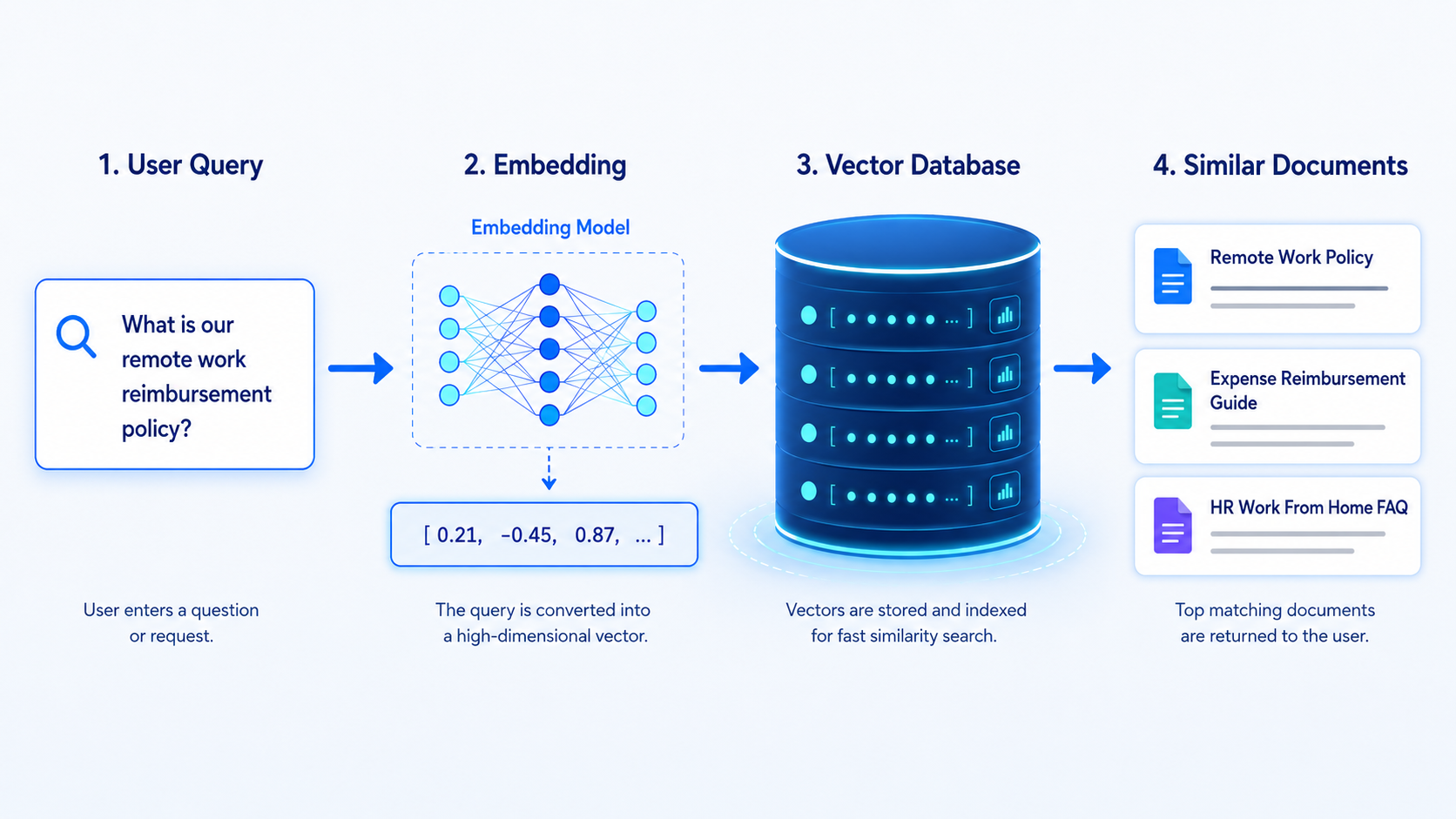
Vector search is the process of finding vectors that are closest to a query vector.
When a user asks a question, the system converts the question into a vector. Then it compares that vector with stored vectors in the database.
Example:
User query:
"Can employees claim home internet bills?"
Query vector:
[0.22, -0.69, 0.39, ...]
Vector database searches for nearby vectors.
Top result:
"Remote Work Reimbursement Policy"
The database returns the closest matches based on a similarity metric such as cosine similarity, dot product, or Euclidean distance.
Pinecone’s documentation notes that semantic search, nearest neighbour search, similarity search, and vector search are closely related terms used for finding meaning-based matches.
What Is Similarity Search?
Similarity search means finding items that are similar to a given input.
In vector databases, similarity is calculated mathematically. The database checks how close vectors are to each other.
For text, similarity usually means semantic similarity.
For images, it may mean visual similarity.
For products, it may mean preference similarity.
For code, it may mean functional similarity.
Example use cases:
| Input | Similarity Search Result |
|---|---|
| “refund policy after 30 days” | Similar policy documents |
| Product image of white sneakers | Similar shoes |
| Customer complaint about delayed delivery | Related support tickets |
| Code error message | Relevant internal documentation |
| User profile | Recommended products or content |
Similarity search is the engine behind many “AI feels smart” experiences.
Retrieving semantically similar vectors does not automatically mean the RAG system has found the best evidence. In production, you also need to measure how often relevant chunks appear in the Top-K results and whether the strongest evidence is ranked high enough to reach the language model. Metrics such as Recall@K, Precision@K, MRR and nDCG make this measurable. My RAG Evaluation Complete Guide 2026 explains how to evaluate retrieval quality separately from context and final-answer quality.
Semantic Search vs Keyword Search
Keyword search is based on words, whereas semantic search is based on meaning.
If a user searches for “WFH reimbursement”, a keyword search may miss a document titled “Remote Work Expense Policy” if the exact term “WFH” does not appear. Semantic search can still find it because the meaning is similar.
Keyword Search vs Semantic Search
| Criteria | Keyword Search | Semantic Search |
|---|---|---|
| Search basis | Exact words and phrases | Meaning and context |
| Works well for | Names, codes, IDs, exact terms | Natural language questions |
| Weakness | Misses different wording | May miss exact required terms |
| Example query | “remote reimbursement” | “Can I claim internet cost while working from home?” |
| Best result type | Exact match documents | Meaningfully related documents |
| Common ranking | BM25, keyword scoring | Vector similarity |
| Best use | Legal terms, product SKUs, IDs | AI assistants, document Q&A, recommendations |
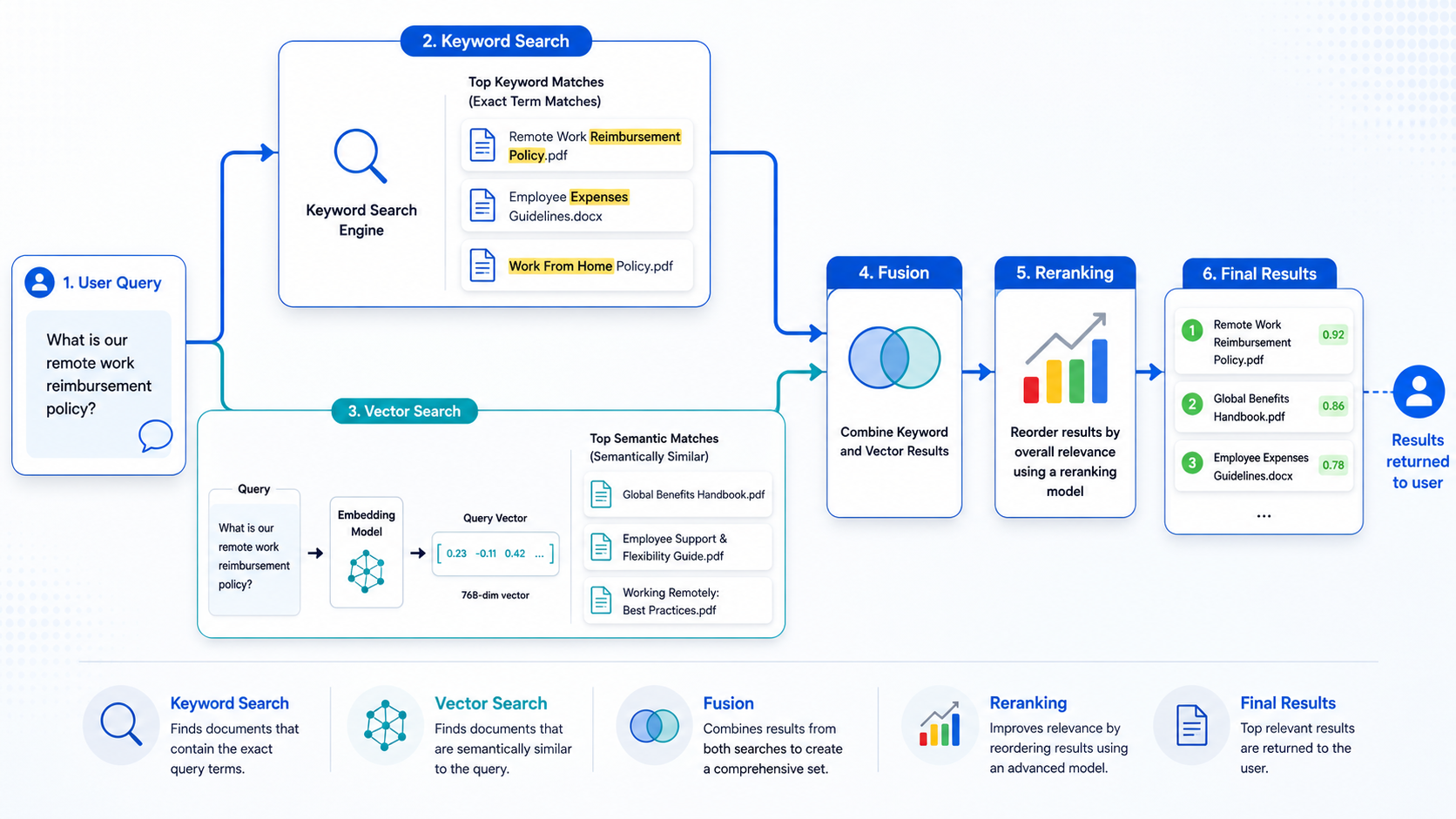
In practice, the best systems often combine both keyword and semantic search. This is called hybrid search.
How Vector Databases Work Step by Step
A vector database workflow usually looks like this:
1. Collect source data
2. Split documents into chunks
3. Convert chunks into embeddings
4. Store embeddings with metadata
5. Convert user query into embedding
6. Search for similar vectors
7. Apply filters and ranking
8. Return relevant chunks
9. Send chunks to the AI model
10. Generate grounded answer
Let’s take a company policy assistant example.
Step 1: Collect Documents
The company uploads HR policies, travel policies, finance rules, IT guidelines, and employee handbooks.
Step 2: Chunk the Documents
Long documents are broken into smaller passages. This is important because AI retrieval works better when chunks are specific.
Step 3: Generate Embeddings
Each chunk is converted into a vector using an embedding model.
Step 4: Store in Vector Database
The system stores vectors with metadata:
Document: Remote Work Policy
Department: HR
Access: Employee
Date: 2026
Chunk: Internet reimbursement rules
Vector: [0.18, -0.73, 0.42, ...]
Step 5: User Asks a Question
“Can I claim Wi-Fi expenses while working from home?”
Step 6: Query Becomes a Vector
The question is converted into an embedding.
Step 7: Vector Search Finds Similar Chunks
The database retrieves the most relevant policy passages.
Step 8: AI Generates the Answer
The LLM uses those retrieved chunks to answer clearly and accurately.
User Query → Embedding Model → Vector Database → Similar Results
Vector Database Architecture
A practical vector database architecture includes several layers:
Source Data
↓
Data Cleaning
↓
Chunking
↓
Embedding Model
↓
Vector Index
↓
Metadata Store
↓
Query Engine
↓
Filtering + Ranking
↓
AI Application
Core components include:
| Component | Role |
|---|---|
| Embedding pipeline | Converts text, images, or code into vectors |
| Vector storage | Stores high-dimensional embeddings |
| Metadata storage | Stores document attributes and filters |
| Vector index | Speeds up similarity search |
| Query engine | Processes vector search requests |
| Filter engine | Applies metadata rules |
| Reranker | Improves final result order |
| Access layer | Enforces permissions and governance |
| Monitoring | Tracks latency, recall, freshness, and errors |
A good vector database is not just a place to store embeddings. It is a retrieval system.
Indexing Explained Simply
If a database has only 100 vectors, it can compare a query with every vector. But if it has 100 million vectors, comparing every vector would be slow.
That is why vector databases use indexes.
An index is a structure that helps the database search faster.
Milvus documentation explains that an index is an additional structure built on top of data; it speeds up search but also adds preprocessing, storage, and memory trade-offs.
Common vector index types include:
- HNSW
- IVF
- Flat index
- Disk-based indexes
- Quantized indexes
A flat index checks everything. It is accurate but slower at scale.
Approximate indexes search intelligently. They may not always check every vector, but they are much faster.
Approximate Nearest Neighbour Search Explained
Approximate Nearest Neighbour search, often called ANN search, is a method for finding very close matches quickly without comparing every item.
Think of a library with millions of books. If you search every shelf one by one, you will get the perfect answer, but it may take too long. ANN search is like using a smart map of the library to quickly reach the most likely shelves.
ANN is important because AI applications need speed.
A user does not want to wait 20 seconds for a chatbot answer. Enterprise systems need retrieval in milliseconds or low seconds, depending on the use case.
OpenSearch documentation describes approximate k-NN as a vector search approach that requires creating vector indexes and using vector fields for scalable nearest-neighbour search.
Google’s Vector Search documentation also describes querying indexes to retrieve nearest neighbours using k-nearest neighbour algorithms.
Metadata Filtering
Vector search finds similar meaning. Metadata filtering narrows the search.
Example:
Find similar documents
ONLY IF:
Department = HR
Region = India
Access Level = Employee
Document Year = 2026
This is extremely important in enterprise AI.
Without filtering, an assistant may retrieve the wrong document, an outdated policy, or unauthorised content.
Pinecone documentation explains that records can include metadata and that search can include metadata filters to limit results to matching records.
Qdrant documentation similarly emphasises combining vector indexes with payload indexes because vector search with filters needs both similarity search and structured filtering support.
Practical metadata fields may include:
- Document type
- Department
- Region
- Language
- Created date
- Updated date
- Author
- Source system
- Customer ID
- Tenant ID
- Access level
- Product category
Metadata filtering is not a small feature. In enterprise RAG, it is often the difference between a demo and a production-ready system.
Hybrid Search: Combining Keyword and Vector Search
Vector search is powerful, but it is not perfect. Sometimes exact words matter.
Example:
Search query:
"Form 16 Part B download error"
Here, “Form 16” is an exact term. A pure semantic search may understand the general topic, but keyword search helps preserve exact terminology.
Hybrid search combines the following:
Keyword Search + Vector Search
Weaviate documentation explains that hybrid search combines vector search and keyword BM25F search by fusing result sets, with configurable weights.
Pinecone documentation also describes hybrid search options using dense and sparse vectors, while noting architectural trade-offs between single-index and separate-index approaches.
Hybrid Search Workflow
User Query
   ↓
Keyword Search finds exact matches
   +
Vector Search finds semantic matches
   ↓
Fusion / Reranking
   ↓
Best Results
Vector Databases in RAG Systems
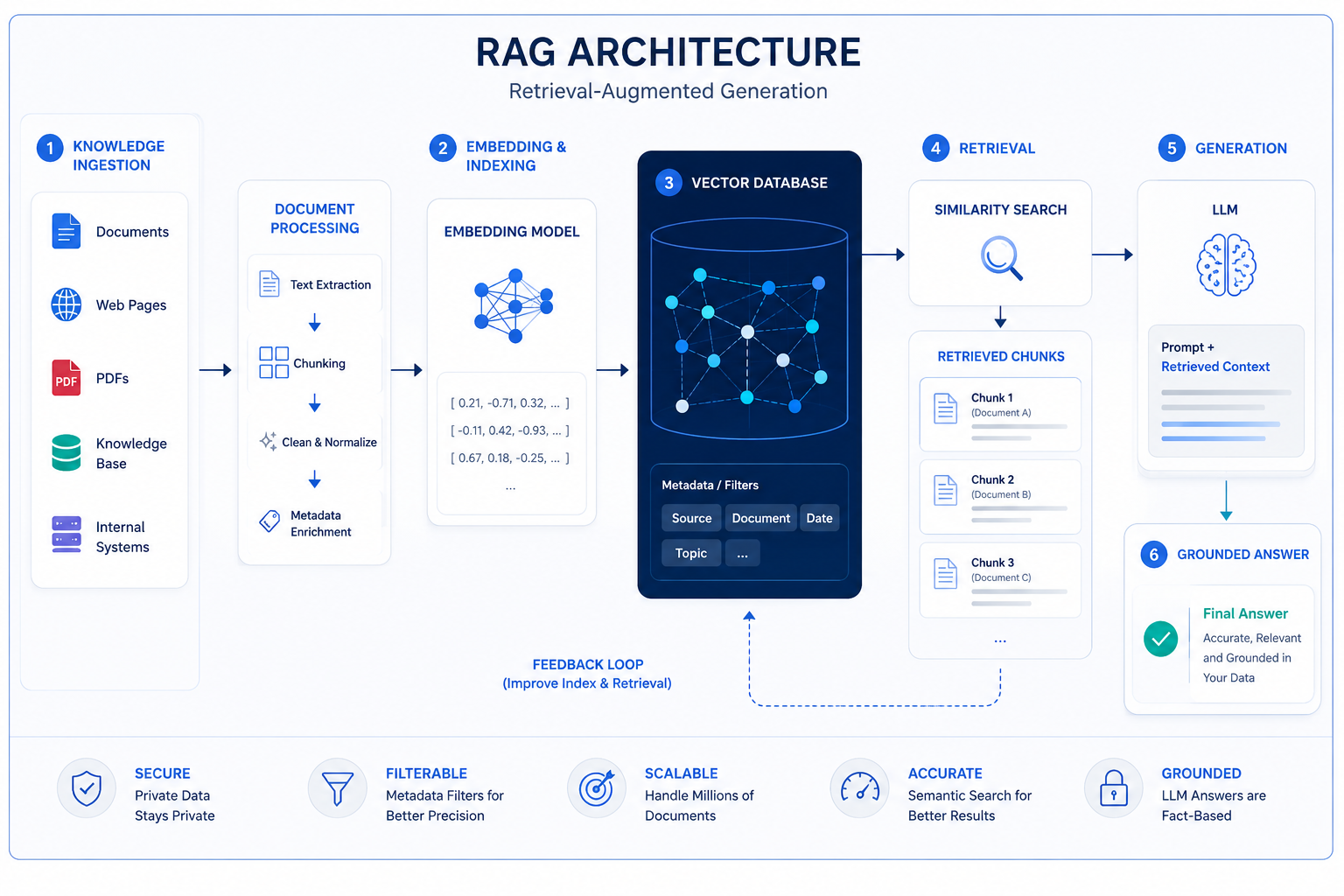
Vector databases are one of the most important components of Retrieval-Augmented Generation.
A RAG system usually works like this:
User Question
↓
Embedding Model
↓
Vector Database
↓
Top Matching Chunks
↓
Prompt Augmentation
↓
Large Language Model
↓
Final Answer
The vector database acts as the retrieval layer. It finds the most relevant context before the AI model answers.
Example: RAG Assistant Retrieving Policy Documents
The user asks:
“What is the reimbursement limit for remote work internet expenses?”
The RAG system retrieves:
- Remote Work Policy
- Employee Expense Policy
- Finance Approval Guidelines
Then the LLM generates an answer based on those retrieved documents.
Without vector retrieval, the LLM may answer from general knowledge. With retrieval, it can answer from the company’s actual policy.
[User Question]
      ↓
[Embedding Model]
      ↓
[Vector Database]
      ↓
[Relevant Knowledge Chunks]
      ↓
[LLM Prompt]
      ↓
[Grounded Answer]
Vector Databases and AI Agents
AI agents need memory, context, and tools.
A vector database can help agents:
- Recall previous interactions
- Search documents
- Retrieve tool instructions
- Match user intent with workflows
- Find similar cases
- Retrieve code examples
- Search product catalogs
- Build long-term memory
For example, an enterprise AI agent may need to answer the following:
“Find similar customer escalation cases and draft a response.”
The agent can use a vector database to retrieve related tickets, product documentation, SLA policies, and previous resolutions.
In this sense, vector databases are not just for chatbots. They are also part of the memory and retrieval layer for agentic AI systems.
Vector Databases vs Traditional Databases
Traditional databases are still essential. Vector databases do not replace them.
A useful way to think about it:
Traditional database = facts, transactions, records
Vector database = meaning, similarity, context
Example enterprise architecture:
| System | What It Stores |
|---|---|
| PostgreSQL | Users, orders, permissions |
| Data warehouse | Analytics and reporting |
| Vector database | Embeddings for documents and knowledge |
| Object storage | Original PDFs, files, images |
| Search engine | Full-text search |
| LLM application | AI answer generation |
In many production systems, vector databases work alongside relational databases, search engines, warehouses, and application APIs.
Vector Databases vs Search Engines
Search engines like Elasticsearch and OpenSearch are built for text search, filtering, aggregation, and ranking. Modern search engines also support vector search.
Dedicated vector databases are built specifically around vector indexing, similarity search, and AI retrieval workloads.
Simple Comparison
| Criteria | Search Engine | Vector Database |
|---|---|---|
| Traditional strength | Keyword search, logs, text search | Similarity search, embeddings |
| Ranking | BM25, custom scoring, filters | Vector distance, hybrid scoring |
| AI use | Search plus vector features | AI-native retrieval |
| Best for | Website search, logs, document search | RAG, recommendations, semantic memory |
| Enterprise fit | Strong for search-heavy systems | Strong for embedding-heavy systems |
Elasticsearch introduced approximate nearest-neighbour search to make vector search more scalable, and OpenSearch supports k-NN vector search through engines such as FAISS, Lucene, and NMSLIB.
Popular Vector Databases in 2026
There is no single “best” vector database for everyone. The right choice depends on architecture, scale, team skill, budget, and compliance needs.
Popular Vector Databases Comparison
| Vector Database | Best For | Strengths | Things to Consider |
|---|---|---|---|
| Pinecone | Managed production AI search | Fully managed vector database, semantic search, hybrid search, metadata filtering | Cloud/service dependency and pricing model |
| Weaviate | Open-source and hybrid search applications | Vector + keyword hybrid search, schema, filtering, modular architecture | Requires architecture planning for production scale |
| Milvus | Large-scale open-source vector search | Multiple index types, high-scale vector workloads, GPU-related options | Operational complexity if self-hosted |
| Qdrant | Developer-friendly vector search with filtering | Strong filtering, payload indexes, Rust-based engine, cloud/self-hosted options | Requires tuning for advanced production cases |
| Chroma | Prototyping and local AI apps | Simple developer experience, popular for local RAG experiments | May not fit every enterprise-scale requirement |
| pgvector | PostgreSQL-based vector search | Keeps structured and vector data together, easy if PostgreSQL already exists | Scaling and query tuning matter |
| Elasticsearch | Existing search stacks needing vector search | Strong search ecosystem, hybrid retrieval, filtering, operational maturity | Vector-first workloads may need careful tuning |
| OpenSearch | Open-source search plus vector search | k-NN support, search engine ecosystem, AWS compatibility | Requires search engineering expertise |
| Google Vertex AI Vector Search | Google Cloud AI search at scale | Managed vector search, integrates with Google Cloud AI workflows | Best fit for Google Cloud-oriented teams |
Milvus documentation states that Milvus supports major vector index types, including HNSW, IVF, FLAT, SCANN, and DiskANN, while also supporting metadata filtering and range search.
Pgvector supports vector similarity search inside PostgreSQL and includes HNSW and IVFFlat indexing options.
Google’s Vector Search 2.0 codelab describes ANN indexes powered by Google’s ScaNN technology for production-scale search.
Use Cases of Vector Databases
Vector databases power many AI features that users already experience.
Vector Database Use Cases
| Use Case | How Vector Database Helps |
|---|---|
| Company document search | Finds policies and internal docs by meaning |
| Customer support chatbot | Retrieves relevant help articles and past tickets |
| Product recommendation | Finds similar products or user preferences |
| RAG assistant | Retrieves trusted context before LLM answers |
| AI coding assistant | Finds internal docs, code snippets, and examples |
| Image similarity search | Finds visually similar assets or products |
| Fraud detection | Finds unusual patterns or similar past cases |
| Knowledge management | Makes enterprise knowledge searchable by intent |
| Personalization | Matches users with relevant content |
| Legal research | Finds related clauses and case documents\ |
Enterprise AI Use Cases
Enterprise AI is where vector databases become especially valuable.
1. Internal Knowledge Assistant
Employees ask questions across HR, finance, IT, legal, and operations documents.
Example:
“Which approval is needed for international travel?”
The vector database retrieves the right travel policy, approval matrix, and finance rules.
2. Customer Support Copilot
Support agents ask:
“Find similar cases where refund failed after payment success.”
The system retrieves similar tickets, root causes, and resolution steps.
3. AI Coding Assistant for Internal Documentation
A developer asks:
“How do I use our internal authentication middleware in Angular?”
The vector database retrieves internal README files, code examples, architecture notes, and API docs.
4. Product Discovery
A user searches for:
“comfortable shoes for long office hours”
Semantic search can return products even if the exact phrase does not exist in the product title.
5. Compliance Search
A risk team searches:
“Show all policies related to customer data retention in India.”
Vector search finds semantically related documents, while metadata filters restrict region, department, and access level.
Practical Examples
Example 1: Searching Company Documents by Meaning
Query:
“Can I work from another city for two weeks?”
Possible retrieved documents:
- Remote Work Policy
- Temporary Relocation Guidelines
- Manager Approval Rules
- IT Device Security Policy
The user did not search for “temporary relocation”, but the system understood the meaning.
Example 2: Product Recommendation
User views:
Minimal white running shoes
Vector search can find products with similar style, function, and visual meaning.
This helps e-commerce systems move beyond exact category matching.
Example 3: Customer Support Chatbot
The customer asks:
“My payment was deducted but the order is not showing.”
The vector database retrieves:
- Payment success but order failed article
- Refund timeline policy
- Similar past support tickets
- Troubleshooting flow
The chatbot can answer more accurately.
Example 4: RAG Assistant Retrieving Policy Documents
The user asks:
“What is the maximum laptop reimbursement limit?”
The vector database retrieves the correct policy chunk from the finance document, not the whole PDF.
This makes the answer more specific and less noisy.
Example 5: AI Coding Assistant Retrieving Internal Documentation
The developer asks:
“How do I add a new design token to our UI system?”
The vector database retrieves:
- Design token documentation
- Component library guidelines
- Angular implementation notes
- Previous pull request examples
A good AI coding assistant is not only about code generation. It is about retrieving the right design-system context at the right moment.
Common Mistakes When Using Vector Databases
Vector databases are powerful, but many teams make mistakes when moving from prototype to production.
Common Mistakes and Fixes
| Mistake | Why It Hurts | Better Approach |
|---|---|---|
| Storing whole documents as one vector | Retrieval becomes too broad | Chunk documents into meaningful sections |
| Ignoring metadata | Results become irrelevant or unsafe | Store department, date, access level, source |
| Using vector search only | Exact terms may be missed | Use hybrid search where needed |
| Not evaluating retrieval quality | AI answers may look good but be wrong | Measure recall, precision, and answer quality |
| No access control | Private data may leak | Apply tenant and user-level filters |
| Forgetting data freshness | AI retrieves outdated content | Re-embed changed documents regularly |
| Choosing tools by hype | Architecture may not fit | Benchmark with your real data |
| Returning too many chunks | LLM prompt becomes noisy | Rerank and select only useful context |
| No observability | Hard to debug bad answers | Log queries, retrieved chunks, scores, and feedback |
| Mixing tenants carelessly | Compliance risk | Use namespaces, filters, or isolated indexes |
A 2026 research paper on filtered ANN search highlights that RAG applications increasingly rely on filtered approximate nearest neighbour search to combine semantic retrieval with metadata constraints.
How to Choose the Right Vector Database
Use this practical decision framework.
Choose Pinecone if:
- You want a managed vector database
- Your team wants less infrastructure management
- You need production semantic search and hybrid search
- You prefer API-first cloud services
Choose Weaviate if:
- You want open-source flexibility
- Hybrid search is central to your use case
- You like schema-based organization
- You need vector search plus keyword search in one platform
Choose Milvus if:
- You need large-scale vector search
- Your engineering team can manage infrastructure
- You want strong open-source vector database capabilities
- You may need advanced indexing options
Choose Qdrant if:
- You need strong filtering and payload support
- You want developer-friendly APIs
- You need cloud or self-hosted flexibility
- Your use case needs real-time semantic search
Choose Chroma if:
- You are prototyping
- You are building local RAG experiments
- You want a simple developer experience
- You are not yet ready for enterprise-scale architecture
Choose pgvector if:
- You already use PostgreSQL
- You want vectors close to relational data
- Your workload is moderate or tightly coupled with SQL
- Your team wants fewer moving parts
Choose Elasticsearch or OpenSearch if:
- Your organization already uses search infrastructure
- You need keyword search, filters, logs, and vector search together
- Your search team understands relevance tuning
- Hybrid search is important
Choose Google Vertex AI Vector Search if:
- Your AI stack is already on Google Cloud
- You use Vertex AI, Gemini, or Google Cloud data services
- You want managed vector search integrated with cloud AI workflows
- You are building enterprise AI search at cloud scale
Security, Privacy, and Governance
Enterprise vector search must be secure by design.
Important questions:
- Who can access each document?
- Are vectors stored in the correct region?
- Is tenant data isolated?
- Are deleted documents removed from the vector index?
- Are embeddings generated from sensitive data?
- Are query logs storing private information?
- Is metadata filtering applied before retrieval?
- Can users see only the content they are authorised to see?
Vector databases store representations of data. Even if embeddings are not plain text, they should still be treated as sensitive when derived from private documents.
Security best practices:
- Use access-control metadata
- Isolate tenants properly
- Encrypt data at rest and in transit
- Monitor retrieval logs
- Remove stale or deleted embeddings
- Apply document-level permissions
- Avoid sending unnecessary sensitive data to external APIs
- Maintain audit trails for enterprise AI assistants
For production RAG, governance is not optional. It is part of retrieval quality.
Future of Vector Databases
Vector databases are evolving quickly.
The future is likely to include:
- Better hybrid search
- Better reranking
- More multimodal retrieval
- Stronger metadata filtering
- Built-in embedding pipelines
- Lower-latency ANN indexes
- Better support for AI agents
- Integrated governance and access control
- More SQL + vector combinations
- More cloud-native vector search services
- Retrieval evaluation becoming standard practice
The biggest shift is this: vector databases are moving from “AI prototype tools” to “enterprise retrieval infrastructure”.
In early RAG demos, teams focused mostly on storing embeddings. In production systems, the real challenge is not just storing vectors. It is retrieving the right context, for the right user, at the right time, with the right permissions, and with enough freshness to trust the result.
That is where vector databases will keep becoming more important.
Final Thoughts
Vector databases are one of the key building blocks behind modern AI applications.
They help AI systems search meaning, not just words. They power semantic search, recommendation engines, RAG assistants, enterprise knowledge systems, AI agents, and coding copilots.
For beginners, the simplest way to understand vector databases is this:
Embedding models convert meaning into numbers.
Vector databases store and search those numbers.
AI systems use the retrieved results to answer better.
If you are learning Retrieval-Augmented Generation, vector databases are a must-understand topic. They are the bridge between private knowledge and intelligent AI answers.
A good vector database setup does not guarantee a good AI product, but a weak retrieval layer almost always creates a weak AI experience.
That is why product teams, developers, designers, and enterprise AI leaders should understand how vector databases work — not only as backend infrastructure but also as a core part of the user experience of AI.
FAQs
1. What is a vector database?
A vector database is a database designed to store and search vector embeddings. These embeddings represent the meaning of text, images, audio, code, or other data as numerical values.
2. Why do AI systems need vector databases?
AI systems need vector databases to retrieve relevant information by meaning. This helps chatbots, RAG systems, AI agents, and recommendation engines find useful context before generating responses.
3. Is a vector database the same as a traditional database?
No. A traditional database stores structured data such as rows and columns. A vector database stores embeddings and searches based on similarity. Both can work together in production AI systems.
4. What is the difference between vector search and keyword search?
Keyword search finds exact words or phrases. Vector search finds meaning-based similarity. For example, vector search can connect “work from home internet claim” with “remote work reimbursement policy” even if the words are different.
5. How are vector databases used in RAG?
In RAG, a vector database retrieves relevant document chunks before the LLM generates an answer. The retrieved chunks are added to the prompt so the AI can respond using grounded context.
6. Which vector database is best in 2026?
There is no single best vector database for every use case. Pinecone, Weaviate, Milvus, Qdrant, Chroma, pgvector, Elasticsearch, OpenSearch, and Google Vertex AI Vector Search are all useful depending on scale, infrastructure, cost, search quality, and governance needs.
7. Can PostgreSQL be used as a vector database?
Yes. PostgreSQL can support vector search using pgvector. It is a strong option when teams already use PostgreSQL and want to store relational data and embeddings together.
8. Are vector databases only for enterprise AI?
No. Vector databases are used in enterprise AI, but they are also useful for personal projects, local RAG apps, e-commerce search, recommendation systems, image search, and developer tools.
9. Do vector databases replace search engines?
Not always. Vector databases are strong for semantic similarity, while search engines are strong for keyword search, filtering, and text relevance. Many production systems use hybrid search that combines both.
Author Bio

Amit Gupta is a UI/UX Designer and Frontend Specialist with more than 20 years of experience in product design, design systems, Angular development, frontend architecture, and emerging technologies. Through AmitGuptaBlogs.com, he shares practical insights on AI, Google technologies, design workflows, development tools, and future technology trends.